MedisCare - Doctor Dashboard V1: A Design Blueprint for Healthcare
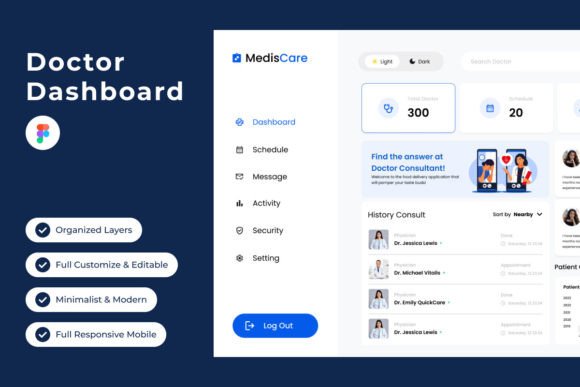
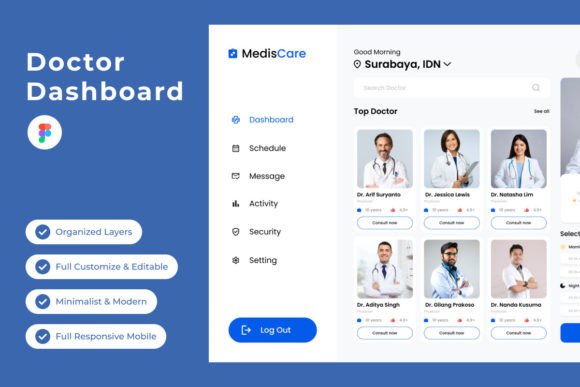
Welcome to MedisCare - Doctor Dashboard V1, your personalized command center for modern healthcare. Seamlessly manage patient records, appointments, and medical insights with intuitive design and precision. With MedisCare V1, empower your practice with efficiency and precision, allowing you to focus on what matters most – providing exceptional care to your patients. Experience the future of healthcare management with MedisCare V1 by your side. This isn't just a dashboard template; it's a meticulously crafted visual system that speaks the language of trust, clarity, and modern professionalism. For designers and healthcare entrepreneurs, it represents a foundational toolkit for building a cohesive digital presence that resonates with both practitioners and patients.
A Visual Language of Clarity and Trust
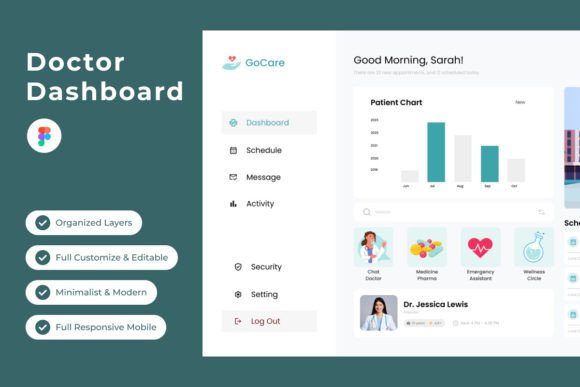
The core appeal of MedisCare V1 lies in its sophisticated, human-centric design philosophy. The dashboard avoids cold, clinical sterility in favor of a warm, organized interface that reduces cognitive load. Strategic use of whitespace guides the eye naturally to critical patient data, upcoming appointments, and actionable insights. The color palette is both calming and functional, employing a thoughtful mix of soft blues, greens, and neutrals that promote focus while differentiating data categories intuitively. Typography is clean and highly legible, using open-source fonts that ensure accessibility across devices. This careful balance of aesthetics and function creates an immediate sense of reliability—a crucial emotional response for any healthcare-related brand.
Beyond the Dashboard: A Toolkit for Brand Identity
While built for a doctor's command center, the design principles within MedisCare V1 are incredibly versatile for broader branding projects. The structured grid system, consistent iconography, and balanced typography create a perfect starting point for developing a full visual identity. Consider using the layout's hierarchy for:
- Logo Design & Brand Marks: The clean lines and modern sensibility can inspire a logo that feels both professional and approachable.
- Website & App Design: The responsive framework provides a solid foundation for clinic websites, patient portals, or health-focused mobile apps.
- Marketing Collateral: Translate the dashboard's data visualization style into compelling infographics for brochures, social media graphics, or presentation decks.
- Editorial Layouts: The organized text styles and spacing are ideal for designing health pamphlets, newsletters, or educational materials.
By extracting the system's core components—its color scheme, typographic scale, and component library—you can ensure visual consistency across every touchpoint, from a business card to a digital ad campaign.
Practical Applications for Creators and Entrepreneurs
For the small business owner or creative entrepreneur in the wellness space, MedisCare V1 is more than inspiration; it's a practical asset. The included .fig file for Figma is fully customizable, with well-organized layers and global text and color styles. This means you can swiftly adapt the design for a yoga studio's booking system, a nutritionist's client tracker, or a mental health app's mood journal. The modern dashboard design is inherently scalable. A freelancer could use its component library to create a series of cohesive social media templates for a health coach client, ensuring every post, story, and ad feels unified and professional. The design's adaptability makes it a valuable commercial font and asset system for anyone creating digital products in the health and wellness sector.
Making the Design Work for You
To leverage a template like MedisCare V1 effectively, focus on adaptation rather than imitation. Start by auditing the included styles. Review the font pairings—often a combination of a sans-serif for body text and a serif or display font for headings—to understand the intended tone. Test these pairings with your own content to see if they maintain readability and hierarchy. Adjust the global color styles to align with your existing brand palette or to evoke a specific mood, like using warmer tones for a pediatric practice or earthy hues for a holistic center. Remember, the goal is to use this robust design system as a launchpad for your unique brand identity, not to replicate the dashboard verbatim. Always verify the licensing for any fonts or assets if you plan to use them in commercial projects for clients.
Ultimately, MedisCare - Doctor Dashboard V1 exemplifies how thoughtful design can bridge the gap between complex functionality and user-friendly elegance. It provides a concrete, high-quality foundation that saves countless hours of initial design work, allowing creators to focus on strategy, content, and client-specific customization. Whether you're building a brand from scratch or refining an existing one, this toolkit offers a professional, cohesive, and visually engaging starting point for projects that demand both precision and warmth.