Stop Scrolling: Why a Curated Instagram Post Bundle Is Your New Secret Weapon
Let’s be honest: staring at a blank canvas in Photoshop when you have a product launch tomorrow is terrifying. You know your brand needs to be on Instagram—consistently—but the mental energy required to design twelve completely unique, yet cohesive, posts from scratch is enough to send you back to bed. This is the daily reality for small business owners, freelancers, and content creators. We are often excellent at our specific craft—whether that’s baking, coaching, or coding—but we aren’t necessarily graphic designers. This is precisely where the utility of a professionally designed Instagram Post Bundle becomes less of a luxury and more of a lifeline.
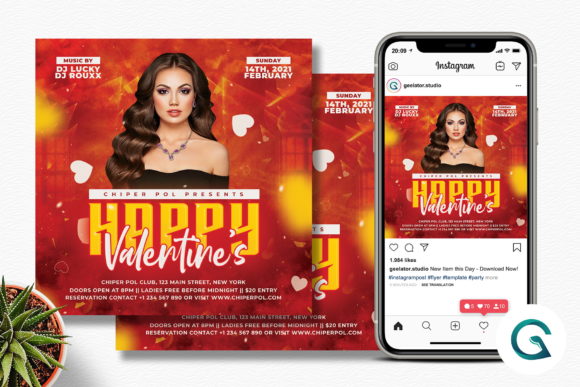
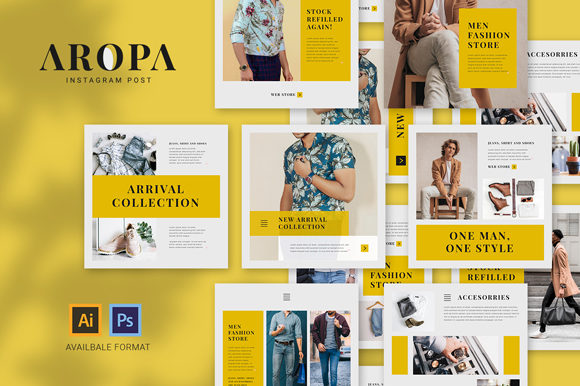
Think of a bundle not as a shortcut, but as a strategic foundation. You aren't just buying graphics; you are buying back your time and securing a professional aesthetic that you might not be able to achieve on your own. The specific bundle we are discussing today is built for flexibility. It includes 12 distinct files, all set to the standard 1080x1080 pixels at 72 DPI in RGB color mode. This ensures that when you upload them, they are crisp, vibrant, and perfectly optimized for the platform's algorithm. But the real magic lies in the file structure. With organized layers and smart objects, these aren't static images; they are dynamic templates waiting for your brand’s DNA.
The Power of the Smart Object Workflow
If you have ever struggled with clipping masks or alignment issues, the workflow of this bundle is going to feel like a breath of fresh air. The designers have structured the PSD files (compatible with CS up to the latest version) specifically to reduce friction. The "Smart Object" feature is the hero here. Imagine you have a beautiful frame for a photo, but you want to insert a picture of your latest inventory. Instead of resizing and cropping manually, you simply double-click the designated layer, drop your high-quality PNG image in, save, and close. The template automatically warps your image to fit the perspective or shape of the design.
This applies to branding assets as well. Changing your logo is often the most frustrating part of using templates, but this bundle simplifies it to a click-and-replace action. You locate the logo layer, access the smart object, insert your vector or high-res logo, and save. The design instantly updates with your identity. It is the same process for text. You don't need to hunt for specific fonts that might be missing; the bundle utilizes free fonts, which means you can install them immediately and start editing without worrying about expensive licensing fees for the typeface itself. You simply select the Type Tool, click the existing text, and replace it with your call to action or quote.
Visual Consistency Across Your Feed
One of the biggest hurdles in social media graphics is the "patchwork" effect—where your feed looks disjointed because every post was created on a different day with a different mood. A bundle solves this by providing a unified visual language. When you use these 12 files, the color palettes, spacing, and typographic hierarchy are already harmonized.
However, customization is key to making it yours. The bundle allows for 100% editability, particularly regarding color. If the template uses a pastel blue that clashes with your earthy brand tones, you don't have to settle. In Photoshop, you can double-click the object layer to bring up the color picker and select the exact hex code of your brand’s primary or secondary colors. If you are an Illustrator user working with the AI or EPS files, the process is just as intuitive: select the object and utilize the color palette to swap the hue. This ensures that while the layout structure is professional, the final result is uniquely yours.
This consistency builds brand recognition. When a user is scrolling through their feed, they should be able to recognize your post before they even read the caption. By maintaining the same visual weight and style across these templates, you train your audience’s eyes to stop when they see your content.
Practical Applications Beyond the Feed
While labeled an Instagram bundle, the utility of these assets extends far beyond the 1080x1080 grid. Because the files are organized and high-resolution, they serve as excellent starting points for other marketing assets.
- Digital Products and Lead Magnets: If you are a blogger or coach, you can repurpose the layout for the cover of a PDF guide or an eBook. The professional typography is already set up for you.
- Website Headers: While the dimensions are square, the elements within—typography treatments, color schemes, and graphic motifs—can be rearranged or cropped for website banners to ensure your site matches your social media presence.
- Email Marketing: Use a modified version of the post as a header image for your newsletter. This creates a seamless transition for subscribers who found you on social media.
- Print Materials: For local businesses, these designs can easily translate to flyers, in-store signage, or price tags. The Adobe Illustrator (AI/EPS) files are particularly useful here, as they are vector-based and can be scaled without losing quality.
Think about a bakery launching a new seasonal cookie. They can use one template for the Instagram announcement, modify the colors slightly for a printable menu insert, and use the text styling for a website popup. This is the essence of a cohesive brand identity.
Matching Typography to Project Goals
The bundle includes recommendations for free fonts, but understanding why these fonts were chosen can help you make better design decisions. Usually, a good social media template balances a display font (something eye-catching for the headline) with a clean sans-serif or serif font for the body text.
When you are editing the text, consider the "voice" of your content. If you are posting a motivational quote, a script font or handwritten font might convey intimacy and warmth. If you are announcing a corporate update or a sale, a bold, modern sans-serif conveys authority and urgency.
Don't be afraid to test font pairings. The templates provide a baseline, but if you have a specific brand font, try swapping it in. Just ensure you maintain the hierarchy established by the template. If the headline is bold and large, keep your custom headline bold and large. Readability is paramount—especially on mobile devices. Ensure your text contrasts sharply with the background. If you change the background object color to something dark, make sure you switch the text to white or a light cream to maintain accessibility.
Scaling Your Content Strategy
For the entrepreneur or content creator, consistency often drops when business picks up. You get busy fulfilling orders, and suddenly you haven't posted in three days. Having a toolkit of pre-designed templates changes your workflow from "creation" to "assembly."
Instead of spending an hour designing a single post, you spend ten minutes swapping out a photo and updating the text. This efficiency allows you to batch your content. You could sit down on a Monday and schedule the entire week's worth of content using this single bundle, ensuring your brand stays top-of-mind without eating into your operational hours.
Furthermore, the professional polish of these templates elevates your perceived value. In the digital marketplace, visual presentation is often equated with trust. A sloppy design can make a great product look cheap, while a clean, organized layout makes a new business look established and trustworthy.
Technical Considerations for a Smooth Workflow
To get the most out of this asset, a few technical best practices are worth noting. First, always ensure you have installed the recommended fonts before opening the file. If you open a PSD without the fonts installed, Photoshop will prompt you with a "Missing Fonts" warning, which can distort the layout and require you to manually re-link every text layer.
Second, when placing your photos, use the PNG format for your main subject if you want to place it "in front" of design elements, as mentioned in the instructions. However, if you are using the Smart Object to fill a specific shape (like a circle or a masked rectangle), a standard high-resolution JPEG will work perfectly fine.
Finally, remember that these files are compatible with a wide range of software versions, from Adobe Photoshop CS to the latest Creative Cloud iterations, as well as Illustrator. This makes them a safe investment even if you upgrade your software later.
Ultimately, this Instagram Post Bundle is more than just a set of pretty pictures. It is a toolkit for visual communication. It bridges the gap between the vision in your head and the professional execution required to succeed in a crowded digital landscape. By leveraging the organized layers, smart objects, and customizable color palettes, you empower yourself to maintain a beautiful, engaging, and consistent presence across all your platforms.