Streamline Your Planning with a Vertical Desk Calendar Template
There’s a unique satisfaction in a well-organized workspace, a physical anchor in the digital storm. For many of us, that anchor is a desk calendar—a daily touchpoint for appointments, goals, and creative sparks. But what if that functional tool could also be a seamless extension of your personal brand or business identity? Moving beyond generic store-bought options, a professionally designed template offers a powerful blend of utility and custom style, turning a simple planning tool into a cohesive brand asset.
Beyond Basic Scheduling: A Canvas for Your Brand
Think of a vertical desk calendar not just as a date tracker, but as a small, year-long billboard on your desk. For a freelancer or small business owner, every page is an opportunity. Imagine your logo, brand colors, and a custom typeface gracing each month. This consistent visual presence reinforces your identity daily, not just for you but for anyone who sees it in your office or home studio. It transforms a mundane item into a piece of professional stationery that speaks to your attention to detail and creative standards.
This approach is particularly valuable for content creators and marketers. Use each month’s page to feature a key quote, a product highlight, or a social media call-to-action. The calendar becomes a content planning hub that visually aligns with your editorial calendar, ensuring your physical and digital presences are in sync. For crafters and hobbyists, it’s a chance to showcase original artwork, photography, or patterns in a functional format you’ll use all year.
The Practical Power of a Ready-to-Use Template
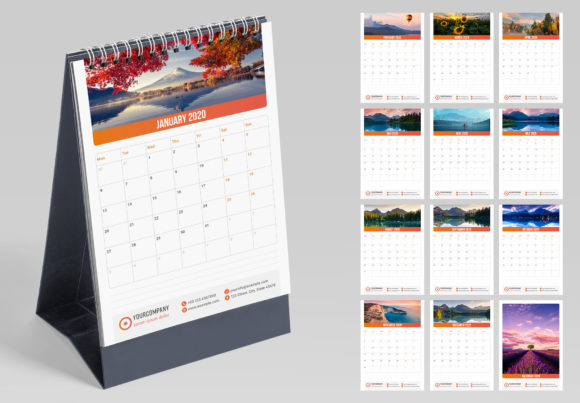
Starting a calendar design from scratch can be a time-consuming puzzle of grid alignment and font sizing. A creative template like the Vertical Desk Calendar eliminates that friction. It arrives as a structured foundation—12 pages plus a cover—all set to A5 size with proper print bleeds and CMYK color mode. This means you bypass the technical setup and jump straight into the creative part: making it yours.
The true efficiency lies in its built-in design systems. Character and Paragraph Styles are not just features; they are your best friends for maintaining consistency. Apply a heading style once, and every subsequent month’s title will match perfectly. Change your mind about the font? Alter the style definition once, and the change cascades through the entire document. Similarly, the Swatches panel allows for one-click color changes across all pages, ensuring your brand palette is applied uniformly without manual, page-by-page edits. This level of control is what separates a polished, professional result from a homemade project.
From Template to Tangible Asset: Making It Your Own
The customization process is designed to be intuitive, even for those with intermediate design skills. The layered document structure in Adobe InDesign (compatible from CS4 to the latest CC) keeps elements organized, making it easy to select and edit text, swap placeholder images for your own photos or graphics, and adjust layout components. Because all fonts, shapes, and elements are editable, you have complete creative freedom.
Consider how you can tailor it for specific uses:
- Client Gifts: Design a custom calendar as a thoughtful, branded end-of-year gift that clients will actually use.
- Internal Marketing: Create calendars for your team featuring company milestones, motivational quotes, or key campaign dates.
- Product Launches: Use the cover and each month’s page to tease and highlight different features of an upcoming product.
- Artistic Portfolio: Showcase a series of illustrations or photographs in a sequential, functional format.
Remember, the included photos in previews are for display. Your power comes from inserting your own visuals—your products, your team, your art—which makes the final printed piece genuinely unique and valuable to your audience.
Design Considerations for Maximum Impact
When personalizing your calendar, keep a few core design principles in mind. First, readability is paramount. While you might choose a stylish display font for month titles, ensure the actual date numbers and any notes sections use a highly legible typeface. Test your printed proof under typical lighting conditions to confirm everything is easy to read at a glance.
Second, maintain visual harmony. Use the provided styles to enforce a consistent hierarchy. Limit your primary color palette to two or three brand colors for a clean look. If you’re incorporating photography, consider using a consistent filter or treatment across all images to tie the months together aesthetically. The goal is a calendar that feels cohesive from January to December.
Finally, think about the physical object. The 3mm bleeds ensure your design extends cleanly to the edge after trimming. Choosing a quality paper stock for printing will elevate the tactile experience, making your calendar feel like a premium product. Whether you print it at home or through a professional service, this attention to the final output makes all the difference in how your brand is perceived.
A vertical desk calendar template is more than a scheduling tool; it’s a versatile design project waiting to happen. It offers a structured yet flexible way to create a custom piece of branded collateral, a personal art project, or a thoughtful gift. By leveraging its professional features—easy style application, one-click color changes, and print-ready setup—you can efficiently produce an item that brings order to your days while reinforcing your unique visual identity, one month at a time.