Transform Your Logo into a Glowing Neon Sign with Ease
There's something undeniably magnetic about a neon sign. It cuts through the visual noise of a busy street or a crowded digital feed, instantly drawing the eye with its vibrant, glowing aura. For designers and business owners, capturing that electric, retro-futuristic energy in branding materials can be a powerful move. But traditionally, creating realistic neon effects has been a complex task, often requiring advanced skills in layer styles, blending modes, and meticulous manual adjustments. What if you could bypass the technical hurdle and achieve that stunning, professional glow in a matter of seconds?
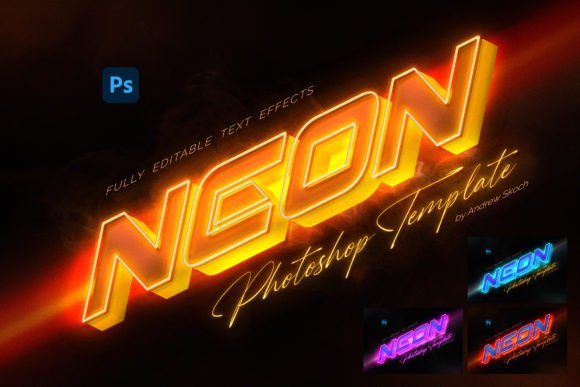
This is where a dedicated Neon Text Effect template becomes an indispensable design asset. It's not just a filter; it's a pre-built system designed to apply a convincing, multi-layered neon glow to any element you place inside it. The magic lies in the use of Smart Object replacement. You simply open the designated layer, place your own text, logo, vector shape, or even a pixel-based icon, save, and the effect applies automatically. The neon outline generates itself, complete with realistic light diffusion, subtle reflections, and that characteristic hum of glowing gas or LED. This approach democratizes a high-end visual style, making it accessible for everything from a startup's brand identity to a blogger's social media graphics.
Why This Effect Works for Modern Branding
Visual consistency is a cornerstone of strong brand recognition. A neon effect used across your logo, website headers, and promotional materials creates an immediate and memorable signature look. Think of the iconic neon signs of vintage diners or the sleek, modern neon accents used by tech companies today. This template offers 4 distinct color variations, allowing you to select the hue that best aligns with your brand's personality—whether it's a classic warm pink, a cool electric blue, a vibrant green, or a striking purple. This consistency helps your audience recognize and recall your brand across different platforms, from a packaging design mockup to an Instagram story.
Beyond aesthetics, the practical benefits are significant. The templates are built at 300 DPI and 3000×2000 pixels, ensuring your final output is crisp and high-resolution, suitable for both digital screens and print materials like posters or invitations. The layers are well-organized and 100% editable, giving you full control to fine-tune the intensity, color, or glow spread if needed. This level of professionalism ensures your designs look polished and credible, which is crucial for building trust with your audience.
Practical Applications Across Your Projects
The versatility of this neon text effect is one of its strongest features. It works seamlessly with a wide array of design elements, making it a true multi-tool for creatives.
- Logo Design & Brand Identity: Instantly elevate a wordmark or symbol for a brand identity presentation. Use it on a business card mockup to show clients how their logo could look as a real-world sign.
- Social Media Graphics: Stop the scroll with eye-catching Instagram posts, YouTube thumbnails, or Facebook ads. A glowing effect on a key word or graphic makes your content stand out in a fast-moving feed.
- Website & Blog Elements: Create stunning hero images, section headers, or call-to-action buttons. The effect adds a dynamic, modern feel to any web design project.
- Digital Products & Marketing Assets: Design compelling covers for e-books, lead magnets, or online course materials. Use it for sale announcements, webinar promotions, or event graphics to generate excitement.
- Print & Merchandise: The high resolution makes it perfect for editorial layouts, magazine covers, or packaging design for limited edition products. Imagine a glowing logo on a tote bag or t-shirt mockup.
- Invitations & Decor: Create unique, personalized invitations for parties, weddings, or corporate events that feel festive and special.
Getting Started: Simplicity Meets Control
You don't need to be a Photoshop expert to use this template effectively. The included PDF help file provides detailed instructions and font links to get you started. The process is intentionally streamlined: open the Smart Object, delete the placeholder content, add your own, and save. The effect is generated automatically, including the nuanced neon outline that gives it authenticity.
This efficiency is a game-changer for busy small business owners and content creators. Instead of spending hours learning complex techniques or outsourcing the work, you can produce professional-grade visuals in minutes. It empowers you to maintain a high volume of quality content, which is essential for audience engagement and growth.
When using such a prominent effect, always consider readability. The template is designed with contrast in mind, but it's wise to test your final design at various sizes. Ensure that your text or logo remains legible when scaled down for a mobile screen or a small merchandise item. The bold, luminous nature of neon generally aids readability, but pairing it with a clean, simple sans-serif font for body text elsewhere in your design can create a balanced and professional font pairing.
Ultimately, this Neon Text Effect template is more than just a flashy design trick. It's a practical tool for visual communication. It helps you inject energy, nostalgia, and modernity into your projects, making your brand or message impossible to ignore. By leveraging its smart automation and high-quality output, you can focus on the bigger picture of your creative strategy, knowing your visuals will consistently hit the mark.